


Operation in the App
The Helper app manages the connection between PowerPoint and the network. Here is what to expect once it is running.
Menu Bar / System Tray
The Helper runs as a background agent — it has no main window. On Mac it appears as an icon in the menu bar. On Windows it sits in the system tray. Click the icon to access its menu.
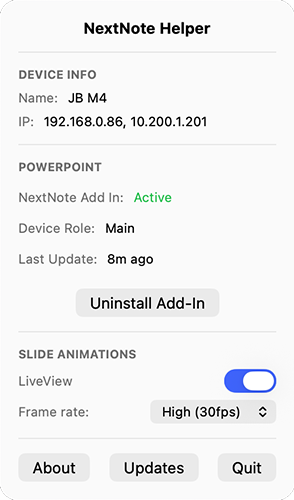
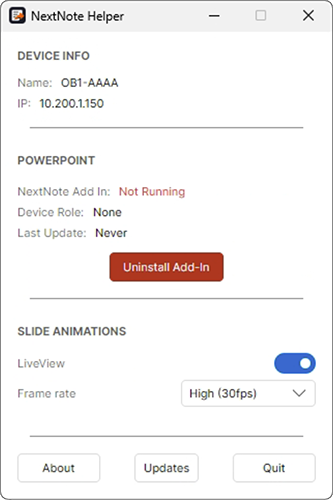
Helper Interface
The Helper menu is divided into several sections:
Device Info
Displays your computer's name and current IP address(es) on the network.
PowerPoint
Shows the connection status to PowerPoint, your device's assigned role, and the timestamp of the last update received from PowerPoint. This section also contains the Install / Uninstall Add-In button for managing the PowerPoint ribbon integration.
NextNote AddIn Status
| State | Meaning |
|---|---|
| Not Running | The Helper is running but PowerPoint is closed. |
| Stopped | The Helper is running and has detected PowerPoint but NextNote is stopped in the ribbon. |
| Active | NextNote is started in PowerPoint and broadcasting to the network. |
Slide Animations
Controls for streaming slide transitions to Display machines. Toggle Live View to enable animation streaming (when off, only still images are sent). Use the Frame Rate dropdown to select 10, 20, or 30 fps depending on your network capacity and machine performance.
Broadcasting
When active, the Helper broadcasts slide content, speaker notes and other information from PowerPoint onto your local network using Bonjour. Any machine running NextNote Display on the same network will automatically discover the Helper — no IP addresses or manual configuration required.
Menu Options
At the bottom of the Helper menu: