


Operation
Manual Helpers
Add a Helper by IP address when automatic discovery is not available on your network.
When to Use Manual Mode
Some network environments block mDNS/DNS-SD traffic — common in managed corporate networks, venues with VLAN isolation, or when machines are on different subnets. In these cases, automatic discovery will not find Helpers and you must add them manually.
Finding the Helper's IP Address
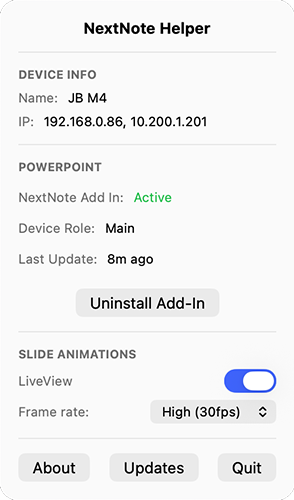
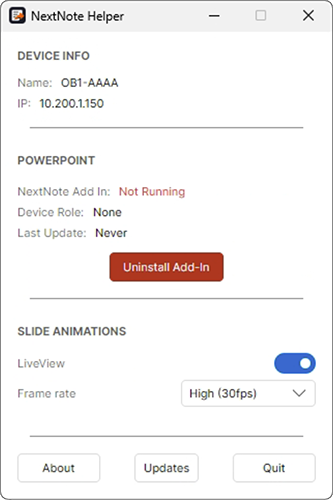
On the presentation machine, open the Helper. The machine's IP address is shown in its device or network information.
Adding a Helper Manually
1
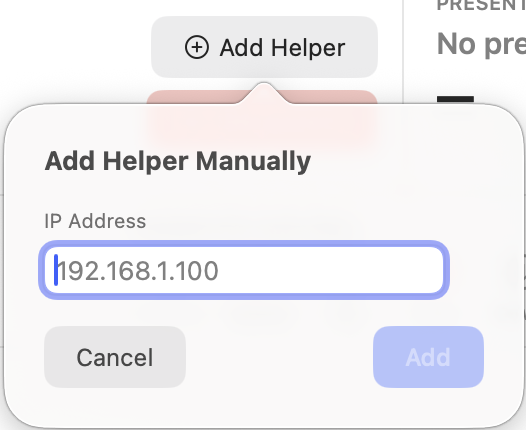
Click Add Helper
Click the Add Helper button in the Available Helpers bar (top-right of the bar).
2
Enter the IP address
Enter the presentation machine's IP address. If your Display license supports both PowerPoint and Google Slides, select the type of Helper you are adding. If the license supports only one platform, NextNote selects it automatically and no product choice is shown.
3
Click Add
The Helper card will appear in the bar. If the Helper is reachable and running, it will show its current state immediately.
Manually added Helpers are not saved between Display launches. You will need to add them again after restarting NextNote Display.
Removing a Manual Helper
Click the bin button on a manually added Helper card to remove it. Automatically discovered Helpers do not have a bin button because their availability is controlled by network discovery.